A library that feels like yours
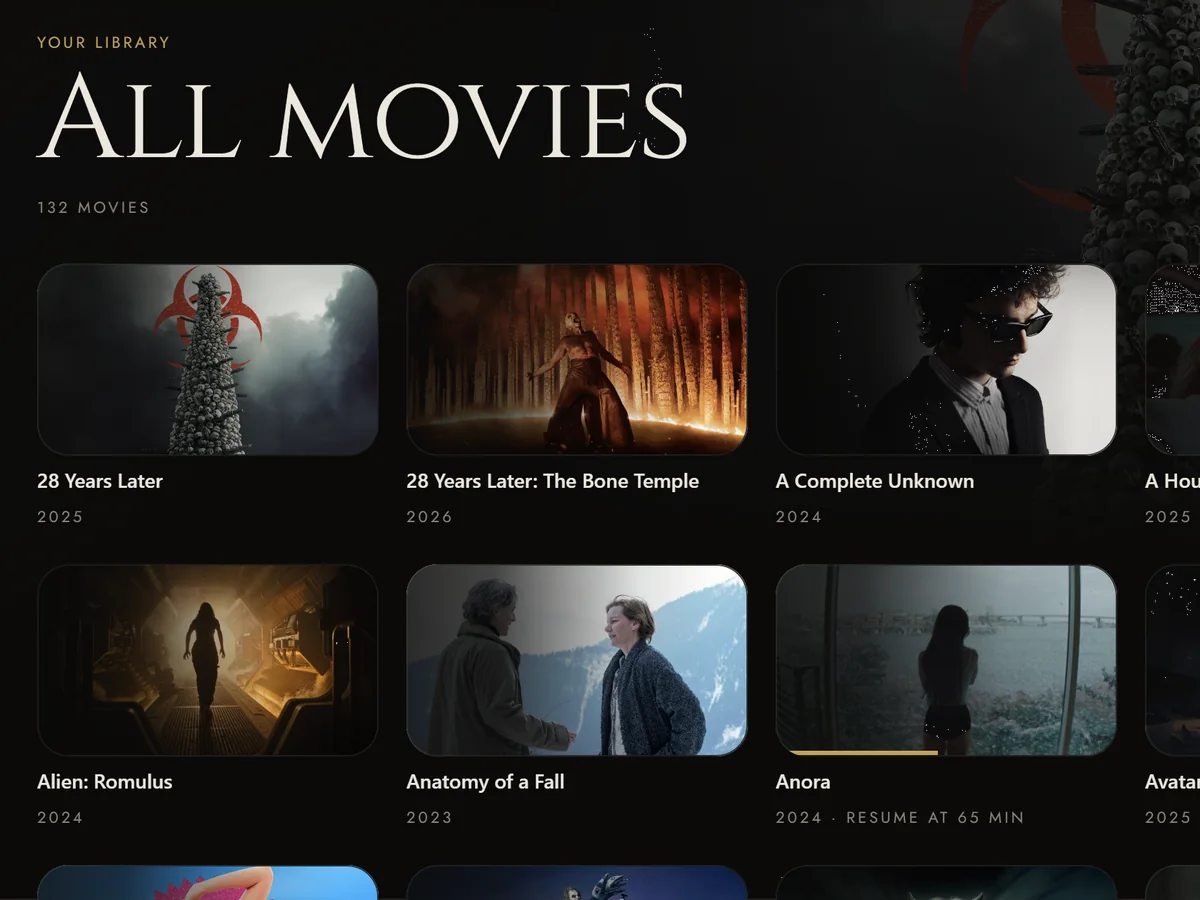
Add your folders. Films and series find their place, with posters, cast and your viewing progress.
Self-hosted. Uncomplicated.
Your films and series, in one place. A small server at home. A native player on your desktop. No account. No telemetry.
Windows macOS Linux
Less setup. More cinema.
Keep your files where they are. Theia brings the library, the player and your friends together.
Add your folders. Films and series find their place, with posters, cast and your viewing progress.
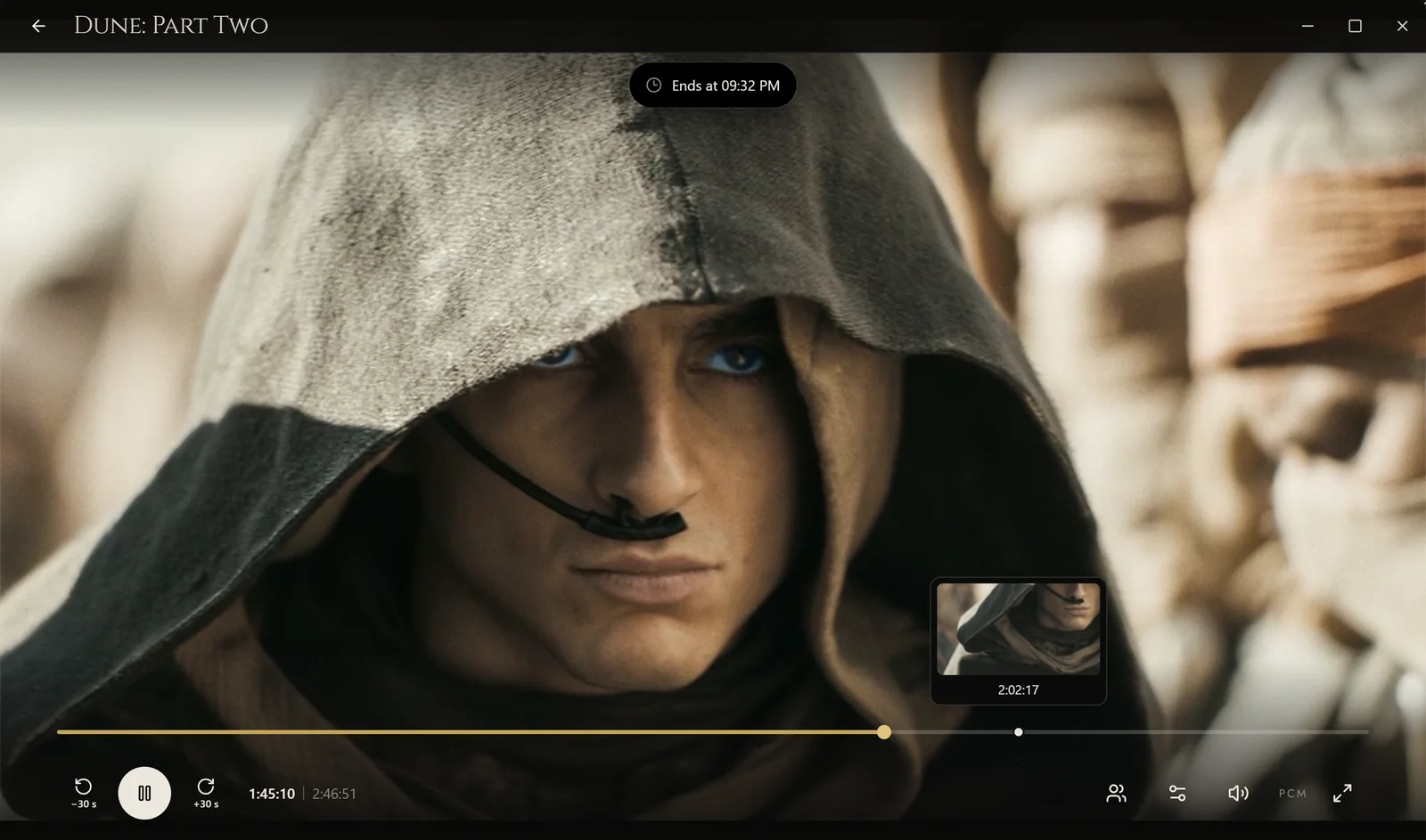
Matroska, image subtitles and a timeline preview. Your audio and subtitle choices stay with your series.
Add friends by code, exchange opinions and invite them into a private room. Remote streams travel directly over WireGuard.
See the actual application
90 seconds. A real installation of Theia 4.4.4 on Windows, without sound.
Choose your system and processor. One setup contains the server, launcher, player and media engine.
Choose English or French, this computer's role and your folders. The setup shows its plan before installing.
Start Theia, allow the server on your trusted network, then choose who is watching and browse your library.
This recording does not show film playback, friends, rooms, the profile editor or changes after 4.4.4. Artwork and cast portraits come from TMDB. Personal files are blurred.
Make yourself at home
Choose your system, then your processor. The download starts only when you choose a file.
v4.4.5PolyForm Noncommercial 1.0.0
Your system
Theia's apps are for desktop computers. The existing browser viewer remains available on phones and TVs; its playback is no longer actively developed.
Windows may show a reputation warning: the setup is not code-signed. Check its SHA-256 before running it. No administrator rights are requested.
Your processor
Player checked with a generated film and visible controls on the maintainer's Windows computer.
theia-setup-windows-amd64.exe4fd93d7a8efab81a688eeb8ec67da58e2b591387404c364c907b793792a9bd9eGet-FileHash -LiteralPath ".\theia-setup-windows-amd64.exe" -Algorithm SHA256This older setup predates 4.4 and does not include the newer player features. Its own version is shown above.
theia-setup-windows-arm64.exed8120abe52555f6fe72b72784a002e7138ba5bcdb348d853bef2c866b3b6f044Get-FileHash -LiteralPath ".\theia-setup-windows-arm64.exe" -Algorithm SHA256The app is ad-hoc signed, not notarised. macOS may require approval in Privacy & Security. Make the setup executable with chmod +x, then run it.
Your processor
Install and generated-film checks on a hosted Apple Silicon Mac. Physical-display HDR and hardware decoding remain unverified.
theia-setup-darwin-arm6487306d915b046ec19afff0fb6a19d8477a80b75f29283875e082f24a6d4c91d1shasum -a 256 -- "theia-setup-darwin-arm64"Checked under Rosetta on a hosted Apple Silicon Mac. Physical Intel hardware, HDR and hardware decoding remain unverified.
theia-setup-darwin-amd64806c15329007c03b362ff1b0d7566553f3c0bacf2525dc1726a6abb072b56115shasum -a 256 -- "theia-setup-darwin-amd64"Ubuntu 24.04, X11 or XWayland only. Install the prerequisites below, then use chmod +x and run the setup. Software decoding, SDR and PCM audio; other distributions are unverified.
sudo apt install libwebkit2gtk-4.1-0 libayatana-appindicator3-1Your processor
Automated installation, generated-film and removal checks passed on a native runner. Real-machine reports are welcome.
theia-setup-linux-amd64db7b68d8a6192f5a6bbef65bd83cd350d924bc3f31544b075f6db439fe3bb168sha256sum -- "theia-setup-linux-amd64"This older setup predates 4.4 and does not include the newer player features. Its own version is shown above.
theia-setup-linux-arm6480be5440939cdd10f7e8ffdbcbba05c92ff3f8a68072eb6b3f30a0647887fa3dsha256sum -- "theia-setup-linux-arm64"Already using Theia? Run the setup to update the desktop programs and keep your library and progress. A server-only update does not replace the player.
The latest, quietly · v4.4.5
Drag and zoom your profile photo before saving. Small photos fill the circle, too.
Named chapters enable Skip opening. The next episode follows a countdown you can cancel, and stops at the end of a season.
Preview a scene before seeking. Keep your audio and subtitle preferences, with settings that stay out of the way.
A few things worth knowing
Straight answers before you press play. Need a hand? Find us on GitHub or Discord.
No. Theia organises and plays video files you already have and are entitled to use. It is not a streaming catalogue and does not supply films. Posters, synopses and cast come from TMDB and are cached locally.
The server, library, ordinary viewing and every V4 feature are free for personal, non-commercial use. Nothing paid exists. Any future paid features, if introduced, will be announced beforehand.
Releases from 4.0 use PolyForm Noncommercial 1.0.0; source code is developed privately and is not published. Version 3.4.0 and earlier remain GPL-3.0 with their source at the public tags. Commercial use requires a separate licence.
Desktop setups exist for Windows, macOS and Ubuntu 24.04. Windows x64 is the only platform used with the maintainer's real library. The bundled 4.4.2 players passed generated-film checks on Windows, Linux x64 and hosted Macs, with Intel under Rosetta; this does not establish your screen or audio chain. Older ARM64 downloads are labelled explicitly.
Linux uses software decoding, SDR and PCM. macOS uses PCM; physical-display HDR and hardware decoding are unverified. Windows requests bitstream and falls back to PCM, but delivery of Atmos or DTS-HD MA to a receiver remains unverified. The browser viewer remains available on phones and TVs without active playback development.
On Windows, open Settings → System → About and read System type: Intel/AMD means x64; an ARM processor means ARM64. On macOS, About This Mac lists either an Apple chip or an Intel processor. On Ubuntu, uname -m returns x86_64 for x64 or aarch64 for ARM64. The site selects the system only; you choose the processor.
Download the setup for your system and processor. Choose the language, whether this computer serves, plays or does both, and your media folders. Start Theia from your launcher or with theia. On macOS and Ubuntu, make the setup executable first. Ubuntu also needs the listed desktop prerequisites.
For an update, run the new setup: your library and progress are kept. The setup and application currently support English and French, independently of this site's language.
No Theia account and no telemetry. Artwork comes from TMDB and updates from GitHub. The friends service uses the project's Firebase database: directory entries include local profile names and pictures even before adding a friend. Friends exchange requests, current presence and opinions; opinions remain in recipients' inboxes until deleted. Presence stores only the last moment, not an activity history; invisible hides presence. Your library catalogue and viewing history are not sent there. Presence can include the title you are watching unless you hide it; invisible mode publishes none of that presence.
Anyone who can reach port 8383 on your network can browse and administer Theia. Use a trusted network and never forward that port to the internet. This website has no analytics, remote embeds or cookies; an explicit language choice is stored only in this browser.
Exchange friend codes, then invite friends into a private room. Remote access uses device keys and direct WireGuard connections, without a media relay or control plane. Discovery, presence and opinions use Firebase. Connectivity depends on your networks.
The maintainer reported a working two-household test session, but private rooms and the shared countdown still lack a complete real two-household validation. There is no live TV, DVR, music library, plugin system or multi-user permissions.
Join the project's Discord or open a GitHub issue. Include your version, system, processor and what happened. For a playback problem, add the file's video/audio formats. Share what worked, too. Never post credentials or a private library publicly; report security issues through the repository's security policy.
Free for personal, non-commercial use under PolyForm Noncommercial 1.0.0. Version 3.4.0 and earlier: GPL-3.0. From 4.0, the source is private. See the licences for their actual terms.
The next evening is yours
Try Theia with your own library. Tell us what worked, what did not, and on which machine.